
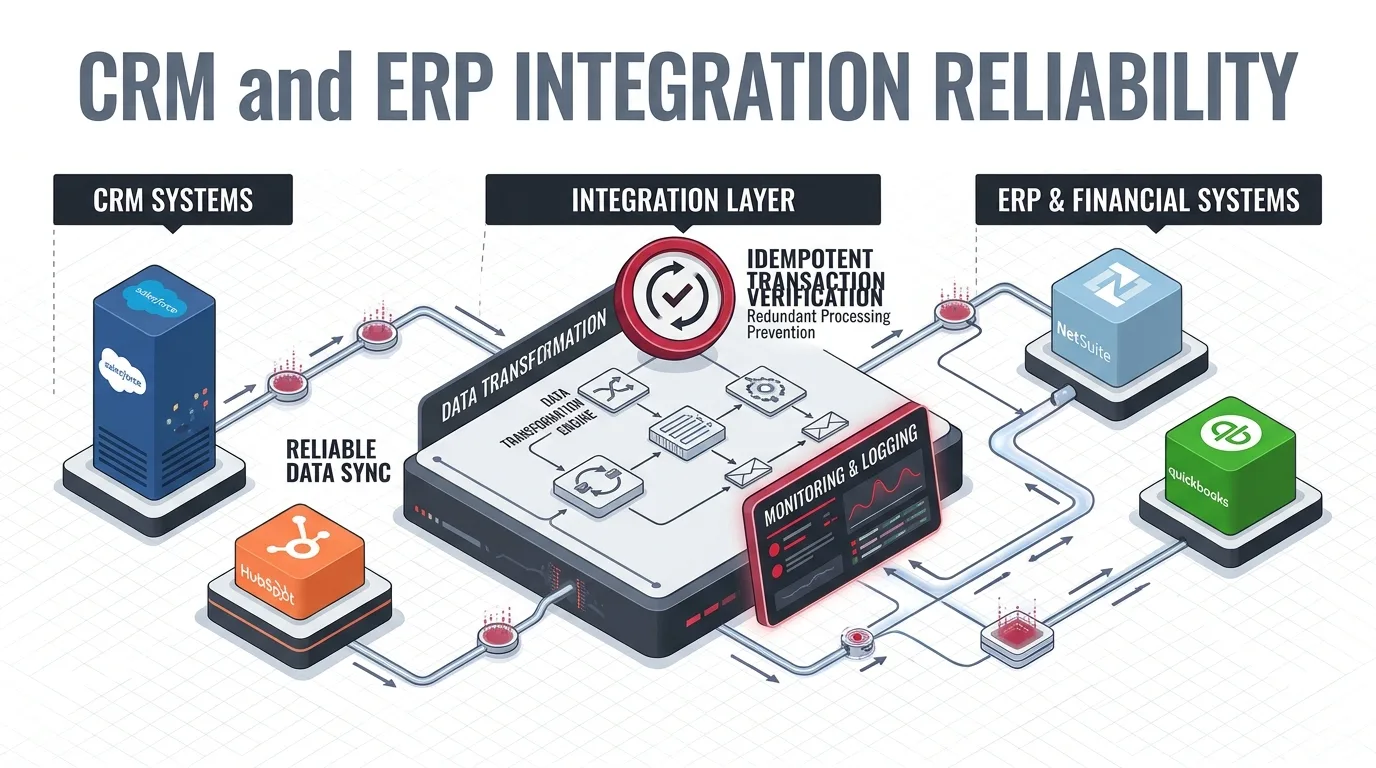
Enterprise Integration Architecture & Reliability Engineering
Connecting a CRM and ERP system can eliminate manual data entry, improve operational visibility, and streamline business processes. But what happens when the integration stops working as expected?
A sales order might be created twice. A customer update might never reach the ERP. An invoice could be generated with incorrect information. Or an integration could appear healthy while records silently fail to synchronize.
These problems are not always caused by poor API development. They often arise because integration architecture does not adequately account for data ownership, retries, duplicate events, partial failures, and operational monitoring.
Whether you are integrating HubSpot with NetSuite, Salesforce with NetSuite, or HubSpot with QuickBooks Online, reliability should be a fundamental part of the integration design—not something added after the first production incident. In this guide, we explore the common causes of CRM–ERP integration failures and the architectural patterns that help prevent data inconsistencies, duplicate transactions, and synchronization problems.
Engineered according to iDesk Media Architectural Standards: Zero Data Loss, Guaranteed Idempotency, and Source-of-Truth Data Governance.
What Is CRM–ERP Integration Reliability?
CRM–ERP integration reliability refers to the ability of connected business applications to exchange, process, and maintain information consistently despite API errors, network interruptions, application changes, and unexpected business conditions.
A reliable integration should do far more than successfully transmit data under normal circumstances. It must be resilient against edge cases and system perturbations, actively handling situations where:
Uncertain API Timeouts
An API request times out after the receiving ERP system has already created the financial transaction.
Duplicate Webhook Delivery
A CRM webhook event is delivered multiple times due to intermediate network retries or platform replays.
Schema & Field Invalidation
A required billing field is missing, a tax code is unmapped, or a currency formatting value is malformed.
API Rate Limits & Throttling
Concurrency quotas or hourly API request thresholds temporarily reject immediate transaction creation.
Downstream Outages
One system experiences maintenance downtime or degraded service while the other continues queuing events.
Partial Transaction Execution
A transaction succeeds in the ERP ledger, but the return callback updating the CRM record fails.
Simultaneous Record Updates
A customer entity is modified at the exact same moment across CRM sales and ERP accounting interfaces.
Interrupted Multi-Step Workflows
A complex workflow is aborted midway, leaving orphaned customer entities without matching general ledger accounts.
The objective is not simply to achieve successful HTTP 200 API requests. It is to maintain business-level consistency across core systems while making failures detectable, recoverable, and traceable.
Why CRM–ERP Integrations Fail
01
Duplicate Events and Repeated API Requests
Many integration failures begin with an assumption that an event will occur only once. In reality, webhooks may be delivered multiple times. Middleware workflows may retry requests. Users may click buttons repeatedly in the CRM interface. Network timeouts may leave the sending application uncertain about whether a transaction was completed.
Real-World Enterprise Scenario:
A sales representative marks an opportunity as Closed-Won in Salesforce. The integration initiates a request to create a NetSuite sales order, but the socket connection times out before Salesforce receives confirmation. The middleware workflow retries the request. Without duplicate-prevention logic, a second sales order is committed in NetSuite. This creates immediate operational chaos: double inventory allocation in the warehouse, duplicate invoices issued to the customer, and corrupted revenue reporting for finance.
Recommended Approach: Idempotent Processing
An idempotent integration ensures that processing the same logical request multiple times produces the exact same business outcome without generating duplicate records. A practical enterprise implementation requires:
- A stable, immutable external identifier for each source CRM record (e.g., Salesforce Opportunity ID).
- A deterministic, unique integration key for each logical transaction (e.g., SHA-256 hash of
OppID + Stage + Timestamp). - A persistent, atomic record of processed transaction keys stored in a fast caching or database layer.
- Pre-flight duplicate detection against the target ERP before attempting transaction creation.
- A reliable bi-directional association linking the source CRM record with the destination ERP transaction ID.
For example, storing the Salesforce Opportunity ID in a custom NetSuite field (custbody_sfdc_opp_id) with an enforced unique-value constraint ensures that NetSuite automatically prevents duplicate creation at the database engine level. Learn more about engineering these pipelines in our deep-dive on Salesforce–NetSuite Integration Architecture.
Technical Graphic 02: Idempotency & Network Timeout Recovery
Fault-Tolerant Retries
02
API Timeouts and Partial Failures
A timeout does not necessarily mean that an operation failed. The receiving ERP might have successfully processed a request even though the sending CRM or middleware application never received the HTTP confirmation packet.
This creates a particularly difficult architectural dilemma: the integration cannot distinguish whether it should retry the request, flag an operational alert, or treat the operation as completed. Consider a standard 4-step order synchronization workflow:
- Retrieve an approved Salesforce opportunity and associated line items.
- Validate customer billing address, tax jurisdictions, and product catalog SKUs.
- Create an authoritative NetSuite sales order via REST API.
- Update the Salesforce opportunity record with the NetSuite order ID and synchronization timestamp.
If step three succeeds but step four fails due to a Salesforce API rate limit or network glitch, the integration is stranded in a partially completed state. NetSuite holds an active order, but Salesforce displays the deal as unsynchronized, prompting sales reps to click “Sync” again.
Recommended Approach: Explicit Processing States
Instead of modeling an integration as an atomic binary (success vs. failure), track the granular progression of each business transaction through a persistent state machine:
| Lifecycle State | Operational Meaning | Fail-Safe Behavior |
|---|---|---|
| RECEIVED | Source CRM event accepted and committed to durable storage | Event safely persisted; cannot be lost if broker restarts |
| VALIDATING | Required fields, business rules, and customer mappings checked | Invalid records diverted to Exception Queue; zero API calls wasted |
| PROCESSING | Target ERP transaction request in flight | Distributed lock active; concurrent executions blocked |
| RETRY PENDING | A recoverable network timeout or transient error occurred | Durable queue schedules exponential backoff with full jitter |
| COMPLETED | ERP transaction committed and CRM cross-reference confirmed | Transaction finalized; idempotency key locked permanently |
| EXCEPTION | Non-recoverable data violation requires human intervention | Quarantined in Dead-Letter Queue (DLQ); alerts sent to admin |
03
API Rate Limits and Throttling
CRM and ERP APIs impose usage limits, concurrency constraints, and subscription-tier restrictions that vary widely by platform. A large bulk synchronization or sudden burst of customer activity can easily exhaust these limits.
For example, during initial customer data onboarding or end-of-quarter pipeline closing, an integration may need to process thousands of records simultaneously. If every record is dispatched immediately without concurrency governance, downstream ERP APIs (such as NetSuite SuiteTalk or QuickBooks Online REST endpoints) begin returning HTTP 429 Too Many Requests or concurrency lock rejections.
Recommended Approach: Queue-Based Processing & Rate Governance
An asynchronous integration queue decouples incoming event ingestion from downstream API execution. Rather than dispatching requests synchronously as they arrive, the architecture places work into a durable buffer and processes transactions according to calibrated system capacity. Architectural benefits include:
- Controlled Request Concurrency: Restricting parallel workers to match ERP account concurrency allocations.
- Traffic Spike Smoothing: Absorbing sudden marketing or end-of-month spikes without crashing endpoints.
- Dynamic Rate Limit Adherence: Automatically parsing
Retry-Afterresponse headers to pause worker threads dynamically. - Predictable Batching: Grouping individual updates into bulk API calls where supported by the platform.
For specialized middleware implementations, explore our dedicated services in API & Middleware Integration and Workflow & AI Automation.
04
Invalid or Inconsistent Data
Not every synchronization error is a technical infrastructure failure. A record may be rejected by the ERP because it contains an invalid billing email address, an unsupported currency code, an inactive inventory SKU, a missing subsidiary assignment, or an unmapped state tax jurisdiction.
If an integration treats these data errors like transient network glitches and repeatedly retries the identical malformed payload, it burns API capacity, floods error logs with operational noise, and delays legitimate transactions queued behind it.
Recommended Approach: Strict Validation Before Processing
Introduce an explicit validation layer prior to ERP dispatch. This layer verifies data integrity before any API call is initiated:
Ensures email syntax, phone formats, ISO-4217 currency codes, and numeric line item quantities comply with ERP schemas.
Verifies that customer IDs, parent accounts, and product line item SKUs exist and are active in the target ERP.
Confirms subsidiary matching, general ledger account classification, and localized tax code assignments.
Validates that approval checkboxes, deal milestones, and credit reviews are marked complete before triggering order creation.
Validation failures are immediately classified as permanent exceptions and routed to human review, preserving automatic retries solely for transient infrastructure issues.
Technical Graphic 03: Governed Error Classification & Retry Lifecycle
Exception Architecture
05
Conflicting Updates and Circular Synchronization
Bi-directional integrations introduce complex circular update loops: a change in CRM triggers an outbound webhook to ERP, which updates the ledger and emits its own outbound notification, triggering the CRM workflow again.
Consider a HubSpot–NetSuite integration where customer billing information is updated in HubSpot. The integration pushes the address to NetSuite. NetSuite triggers a workflow update that pushes back to HubSpot. Without loop-prevention filters, this creates infinite API ping-pong, burns monthly rate limits, and can overwrite concurrent human edits.
Recommended Approach: Field-Level Ownership & Change Detection
Establish an unambiguous Master Data Management (MDM) ownership model designating the single authoritative system of record for every individual business attribute:
| Data Domain & Attribute | Authoritative Source | Sync Direction & Rules |
|---|---|---|
| Marketing Preferences & Opt-in Status | HubSpot | Unidirectional (HubSpot → NetSuite). ERP cannot overwrite. |
| Sales Qualification & Pipeline Stage | Salesforce / HubSpot | Unidirectional (CRM → ERP). Triggered on Closed-Won milestone. |
| ERP Customer ID & General Ledger Number | NetSuite / QuickBooks | Unidirectional (ERP → CRM). Generated upon ledger entity creation. |
| Accounting Transaction & Payment Status | NetSuite / QuickBooks | Unidirectional (ERP → CRM). Read-only visibility in CRM deal widgets. |
| Campaign Attribution & Source Channel | HubSpot | Unidirectional (HubSpot → NetSuite). Tagged on transaction headers. |
| Product Price Books & Accounting Config | NetSuite | Authoritative in NetSuite. Synced to CRM product catalog. |
Additionally, modern integrations compute a hash of payload values before dispatch. If the inbound payload contains the identical values already recorded in the system, execution terminates immediately, breaking circular loops at the boundary. For end-to-end guidance on customer and ledger ownership, read our guide on CRM Consulting & Implementation.
Five Architectural Patterns for More Reliable Integrations
Enterprise reliability is not an abstract concept—it is achieved by applying proven architectural patterns that isolate failure domains, govern concurrency, enforce idempotency, and provide operational transparency.
•
Structural Decoupling
Centralized Integration Layer
Rather than creating point-to-point bespoke spaghetti code between every pair of business applications, introduce a governed, centralized integration layer. This layer centralizes authentication, data transformation, schema mapping, validation, logging, and retry policies.
Centralizing logic ensures that when NetSuite releases a bi-annual SuiteTalk schema update or Salesforce refreshes an OAuth endpoint, code adjustments are made once in the integration layer rather than duplicated across dozens of ad-hoc scripts.
•
Real-Time Velocity
Event-Driven Integration Architecture
Event-driven integration processes changes the moment relevant business events occur rather than relying exclusively on scheduled polling scripts. When a deal reaches Closed-Won, a platform webhook triggers immediate processing:
Event-driven processing compresses transaction latency from hours to seconds. However, events alone do not guarantee reliability—they mandate strict idempotency guards, queue buffering, and dead-letter queues to handle network spikes safely.
•
Controlled Bulk Efficiency
Scheduled Synchronization and Incremental Checkpoints
Scheduled batch synchronization remains ideal for high-volume reference data, such as syncing product catalog pricing or reconciling daily general ledger entries. The architecture queries records modified since the previous successful synchronization cursor (last_modified >= checkpoint).
The critical design mandate is maintaining durable checkpoint cursors. If a batch run fails halfway through processing 5,000 customers, the cursor must not advance, ensuring no records are silently skipped during subsequent runs.
Technical Graphic 05: Event-Driven vs. Scheduled Architecture
Execution Paradigms
•
Fault Isolation
Durable Queues and Controlled Retries
A durable queue (e.g., Redis Streams, AWS SQS, or RabbitMQ) ensures that accepted events are never lost if downstream ERP endpoints experience temporary network drops or scheduled maintenance.
Enterprise retries must be strictly bounded and governed. Blindly retrying an unclassified error 50 times burns system capacity and can lock database tables. Use the following structured retry taxonomy:
| Error Category | Real-World Example | Recommended Architectural Handling |
|---|---|---|
| Transient Network Fault | HTTP 502 Bad Gateway / TCP connection reset | Retry with exponential backoff & jitter (Max 5 attempts: 2s, 8s, 32s, 128s). |
| API Rate Limit Exceeded | HTTP 429 Too Many Requests / NetSuite concurrency lock | Obey Retry-After response header; dynamically throttle queue concurrency. |
| Target Server Downtime | HTTP 503 Service Unavailable / Maintenance window | Buffer events in durable queue; resume worker dispatch upon health check 200 OK. |
| Data Schema Validation | Missing required subsidiary / malformed tax identifier | Route directly to Exception Queue (DLQ). Halt automatic retries. Alert Data Steward. |
| Authentication Failure | OAuth2 bearer token expired / invalid client secret | Automated token refresh routine. If rejected, alert infrastructure administrators. |
| Business Rule Violation | Customer credit limit exceeded / inactive customer entity | Quarantine payload; generate operational task in CRM for Finance review. |
| Duplicate Transaction | Transaction key already exists in idempotency registry | Reconcile existing ERP record; return confirmation reference to CRM; mark completed. |
•
Continuous Integrity
Source-to-Target Reconciliation and Recovery
Even the most meticulously engineered integration architectures can experience edge-case anomalies. Reconciliation provides a secondary verification mechanism to compare records across CRM and ERP systems, identifying discrepancies that normal event logging failed to capture.
For instance, an automated daily reconciliation job audits eligible Salesforce opportunities against NetSuite sales orders created over the trailing 24 hours. The job flags:
- Opportunities marked Closed-Won that possess no corresponding NetSuite order ID.
- NetSuite sales orders that lack valid Salesforce Opportunity external reference keys.
- Discrepancies in total dollar amounts, currencies, or sales tax totals between systems.
- Transactions stranded in intermediate processing states for longer than 60 minutes.
- Duplicate ERP orders generated from the same underlying CRM deal.
Technical Graphic 04: Scheduled Reconciliation & Audit Engine
Data Parity Audit
How to Design a Reliable Integration Workflow
To illustrate these reliability principles in practice, let’s step through an enterprise Salesforce-to-NetSuite order creation workflow for a high-growth B2B business. The objective is to convert an approved Salesforce opportunity into an active NetSuite sales order and return the confirmed order reference to Salesforce.
Define the Authoritative Business Event
Establish the precise criteria that trigger order processing. Never initiate order creation merely because any CRM field is edited. Require a deterministic business trigger, such as: Stage = Closed Won AND Finance_Approved__c = TRUE AND Order_Created__c = FALSE.
Validate the Source Record Before Dispatch
Execute pre-flight checks: confirm the customer account possesses an active NetSuite Internal ID, product line items correspond to active NetSuite SKUs, quantities are positive integers, and tax addresses are complete. If validation fails, update Salesforce with the specific validation error and alert the deal owner.
Create a Durable Integration Event
Persist the validated transaction payload in a durable message queue or database. The integration must preserve sufficient state to resume processing independently without requiring the sales rep to trigger another event if downstream services hiccup.
Apply Atomic Duplicate-Prevention Rules
Generate a unique idempotency key based on the Salesforce Opportunity ID. Query the integration registry and NetSuite database to verify no transaction has been created with this key. Acquire an atomic processing lock for the transaction ID.
Process the Target ERP Transaction
Submit the sales order creation request to NetSuite via REST Web Services, attaching the Salesforce Opportunity ID to custbody_sfdc_opp_id. Respect NetSuite concurrency governance and rate limits. Review our detailed architectural breakdown in the NetSuite Order-to-Cash Process Guide.
Confirm and Associate the Result
Upon receiving NetSuite’s HTTP 201 response containing the new Sales Order ID (e.g., SO-48192), update the Salesforce Opportunity record with the NetSuite order ID, order link, and sync timestamp. If the Salesforce update fails, mark the transaction state as RETRY_SFDC_UPDATE to complete the association without re-creating the NetSuite order.
Monitor and Reconcile Continuously
Track processing latency, queue depth, and error rates. Run daily reconciliation sweeps to verify that every closed deal over the prior 24 hours corresponds to an active, accurately calculated NetSuite sales order.
Technical Graphic 01: Complete Fault-Tolerant Integration Architecture
Reference Topology
Monitoring: What Should You Measure?
Effective monitoring focuses on business outcomes and operational reliability rather than merely counting successful API requests. An integration can return HTTP 200 responses while continuously writing malformed data or skipping failed deals.
| Integration Health Metric | Operational Indication | Engineering Diagnostic |
|---|---|---|
| Processing Success Rate | Percentage of eligible business events successfully completed end-to-end | Drops indicate systemic schema shifts or downstream service degradation |
| Failed Transaction Count | Absolute volume of records diverted to exception queues | Spikes indicate data validation issues or missing reference mappings |
| Processing Latency (P95 / P99) | Elapsed time between source CRM event and confirmed ERP creation | Creeping latency signals queue bottlenecks or API throttling backpressure |
| Queue Depth | Total volume of unprocessed records waiting in durable buffers | Sustained accumulation reveals worker shortages or ERP outages |
| Retry Rate | Frequency of recoverable errors triggering automated backoff | High rates reveal transient network instability or aggressive rate limiting |
| Duplicate Prevention Count | Number of duplicate events safely intercepted by idempotency keys | Validates deduplication effectiveness; sudden spikes reveal webhook replay loops |
| Reconciliation Discrepancies | Total variances discovered between CRM and ERP ledgers during daily audits | Identifies silent edge-case failures that slipped past real-time logging |
| Age of Oldest Pending Record | Duration the longest-waiting record has spent in the queue | Prevents head-of-line blocking from stalling time-sensitive deals |
| API Quota Consumption | Current API consumption relative to platform limits | Warns before hitting hard subscription throttling or overage fees |
Alerting and Operational Ownership
Monitoring is only effective when paired with clear operational ownership. A resilient organization clearly answers:
Downstream outages, auth token revocations, and rate limit exhaustion require instant alerting to integration engineers.
Sales operations or RevOps owns fixing missing customer addresses, while sales reps own updating inactive SKUs.
Administrators must have an audited interface to replay corrected transactions safely without generating duplicates.
Enterprise release governance dictates testing bi-annual Salesforce and NetSuite major releases in sandbox environments first.
Native Connectors, Middleware, or Custom Integration: Which Is More Reliable?
Reliability does not automatically depend on whether an integration is native, middleware-based, or custom-built. The critical evaluation is whether the chosen architecture provides the operational controls required by your specific business process.
| Architectural Approach | When Appropriate | Reliability & Operational Considerations |
|---|---|---|
| Native App Connector | Standard, out-of-the-box workflows with minimal schema customization | Fast setup, but limited error visibility, inflexible retry logic, and zero support for custom reconciliation routines. |
| Middleware / iPaaS (Boomi, Workato, n8n) | Configurable multi-step workflows across multiple enterprise applications | Built-in queues, visual flow debugging, and monitoring. Watch platform execution costs and vendor lock-in. |
| Custom Node.js Microservice | High-volume transaction throughput, complex business logic, bespoke schemas | Total architectural control over idempotency, queues, and retries. Demands disciplined internal DevOps and maintenance. |
| Direct API Integration | Simple point-to-point data synchronization between lightweight apps | Avoid tightly coupled synchronous webhooks where failures or volume spikes disrupt core business operations. |
A custom integration is not inherently more reliable than a native connector—it simply grants engineering teams complete control over how retry, queueing, and idempotency mechanisms are enforced. Likewise, middleware does not automatically prevent records from being lost or duplicated unless properly architected. Compare real-world implementation trade-offs in our evaluation of HubSpot–QuickBooks Integration Strategies.
A Practical Integration Reliability Checklist
Before deploying any CRM–ERP integration to production, review your architecture against this comprehensive engineering readiness checklist:
- check_circle Authoritative system of record defined for every individual field.
- check_circle Stable external identifiers enforced for cross-system record matching.
- check_circle Deterministic business triggers defined (not arbitrary edit triggers).
- check_circle Pre-flight validation layer checks data types, required fields, and SKUs.
- check_circle Idempotent key checking prevents duplicate creation upon retry.
- check_circle Transient failures clearly classified from permanent schema violations.
- check_circle Bounded retry policies with exponential backoff and jitter implemented.
- check_circle API rate limits, quotas, and concurrency caps dynamically respected.
- check_circle Accepted payloads buffered in durable queues before API execution.
- check_circle Partial transaction failures isolated and safely re-associated.
- check_circle Real-time tracking of processing success rates, latency, and queue depth.
- check_circle Structured audit logging linking CRM IDs to ERP transaction references.
- check_circle Immediate alerting for auth drops, outages, and queue bottlenecks.
- check_circle Automated daily reconciliation routines verifying cross-system parity.
- check_circle Documented operational ownership and escalation paths for RevOps and IT.
- check_circle Simulated network socket drops and timeout recovery scenarios tested.
- check_circle Repeated webhook replays validated against idempotency deduplication.
- check_circle Malformed payloads and missing required fields routed to DLQ cleanly.
- check_circle Simultaneous record update conflicts and circular loop tests executed.
- check_circle Load testing executed to verify queue buffer stability during traffic spikes.
How iDesk Media Approaches Integration Reliability
At iDesk Media, we approach CRM–ERP integration as a business-process and systems-engineering discipline. The objective is to connect applications in a way that accelerates business velocity while accounting for the practical constraints of APIs, data schemas, and human operations.
Our specialized integration engineering practice delivers:
Master data management, field-level ownership modeling, and schema normalization across Salesforce, HubSpot, NetSuite, and QuickBooks.
Bespoke Node.js microservices, Boomi implementations, and high-performance event-driven workflows with guaranteed message delivery.
Distributed locks, stable transaction hashing, and atomic verification gates eliminating duplicate order commitments.
Automated ledger auditing, health telemetry dashboards, and self-healing reconciliation scripts detecting silent sync discrepancies.
We begin by thoroughly analyzing your business workflows and technical architecture, identifying the optimal integration approach based on operational requirements, volume complexity, and long-term maintainability.
Frequently Asked Questions
Why do CRM and ERP integrations create duplicate records?
Duplicates typically stem from repeated webhook deliveries, automatic retries triggered after network timeouts, overlapping automated workflows, users double-clicking sync buttons, or the absence of strict database record-matching rules. Implementing idempotent processing and persisting stable cross-system external IDs completely prevents duplicate creation.
What is idempotency in API integration?
Idempotency is an API design property ensuring that processing the same logical request multiple times produces the exact same business outcome without creating unintended duplicate records. It is essential when executing automated retries following uncertain network timeouts or connection resets.
Should an integration use real-time synchronization or scheduled synchronization?
Real-time or event-driven synchronization is ideal when business velocity matters, such as converting won deals into immediate warehouse fulfillment orders. Scheduled batch synchronization is better suited for high-volume catalog synchronization, non-urgent reference data, or scheduled end-of-day general ledger reconciliation. The choice should reflect operational requirements, API rate limits, and latency tolerances.
What happens when an API request fails?
A resilient integration immediately classifies the error. Transient network drops and rate limits are retried automatically using exponential backoff. Permanent schema errors, invalid SKUs, and auth failures are routed to an Exception Dead-Letter Queue (DLQ) for human correction, preserving the transaction’s processing state throughout.
How can we prevent duplicate Salesforce opportunities from creating multiple NetSuite orders?
Store the unique Salesforce Opportunity ID inside a dedicated NetSuite field (custbody_sfdc_opp_id) configured with a strict unique-value constraint. Before dispatching order creation, verify whether a NetSuite order already contains that ID. If a network timeout occurs, re-query by external ID before retrying insertion.
Is middleware necessary for reliable CRM–ERP integration?
Not in every case. Native marketplace connectors may suffice for simple, out-of-the-box workflows. Middleware (iPaaS) provides visual orchestration, built-in queues, and enterprise monitoring, while custom Node.js microservices provide absolute control over idempotency, custom data transformations, and high-throughput processing. Reliability depends on architectural design, not software packaging.
How do you detect silent synchronization failures?
Silent sync failures occur when records fail to trigger webhooks or when transactions fail without generating alerting logs. The primary defense is automated reconciliation: daily scripts that audit eligible source CRM records against target ERP records, comparing external IDs and line-item totals to isolate missing or inconsistent transactions.
How often should integrations be reconciled?
The reconciliation frequency should mirror business criticality. High-volume, financially sensitive order-to-cash workflows typically run automated hourly or daily reconciliation checks. Reference data, such as customer contact directories or product catalog lists, can be reconciled weekly.
Conclusion: Engineering Beyond the Happy Path
CRM–ERP integration is not complete simply because two applications can successfully exchange API requests under ideal conditions.
A reliable integration architecture must account for duplicate events, uncertain network timeouts, invalid data schemas, conflicting bi-directional updates, transaction integrity, and operational recovery.
The most effective architectures combine clear data ownership, event-driven pipelines, durable queues, strict idempotency, controlled retries, real-time observability, and scheduled reconciliation. These engineering controls empower organizations to eliminate synchronization errors, improve operational velocity, and maintain absolute confidence in the financial and customer data powering their business.
If your CRM and ERP integration is currently suffering from duplicate transactions, delayed synchronization, or silent record dropouts, the first step is understanding where the breakdown occurs and whether your existing architecture possesses the capabilities to detect and recover from it automatically.
Architecture Advisory
Need help evaluating your CRM–ERP integration architecture?
iDesk Media helps growing enterprises design, implement, troubleshoot, and scale robust CRM–ERP integrations across HubSpot, Salesforce, NetSuite, QuickBooks Online, Odoo, and custom enterprise stacks.