
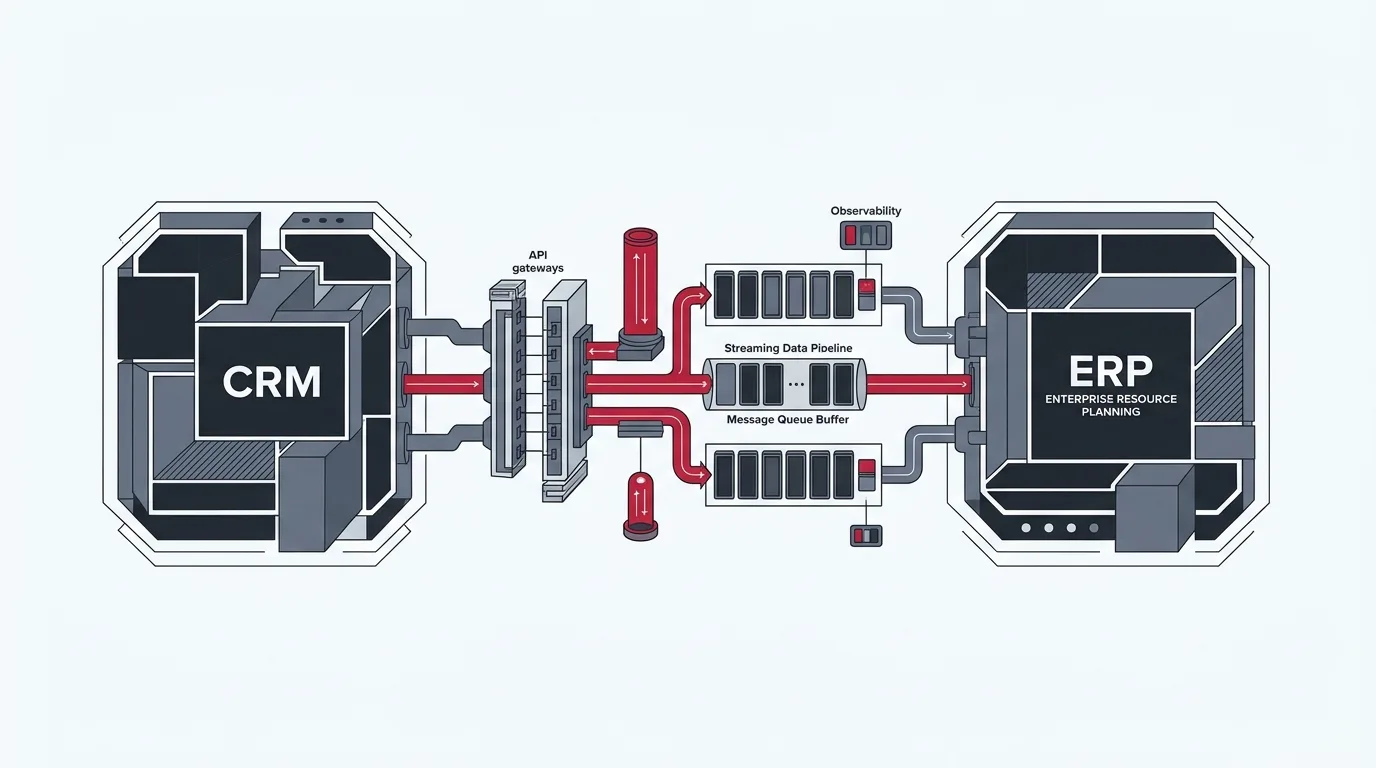
Enterprise Systems Architecture & Reliability Engineering
A CRM and an ERP can be perfectly configured individually and still create serious operational problems when connected.
A sales representative updates a customer’s address in the CRM. The ERP continues using the old address. An order gets created twice because an integration retries a request that actually succeeded. An invoice is generated, but its status never reaches the CRM. Meanwhile, the operations team starts maintaining spreadsheets to reconcile information between systems that were supposed to eliminate manual work.
These problems are rarely caused by the API connection alone. They usually emerge from decisions about data ownership, synchronization logic, error handling, and how the integration responds when something goes wrong.
Building a CRM–ERP integration is one challenge. Making it dependable as transaction volumes increase, business processes evolve, and systems experience occasional failures is an entirely different one.
This guide examines the engineering principles behind reliable CRM and ERP integrations, including practical implementation patterns, failure recovery, monitoring, and reconciliation. Whether connecting HubSpot with NetSuite, Salesforce with NetSuite, or HubSpot with QuickBooks Online, reliability must be designed into the foundational architecture.
What Does Integration Reliability Actually Mean?
Integration reliability is the ability of connected systems to exchange, process, and maintain accurate business information consistently—even when individual requests fail, APIs become unavailable, or records change unexpectedly.
A reliable integration should satisfy five important conditions:
Information arrives without unintended changes, omissions, or corruption.
Connected systems eventually reflect the correct business state.
Temporary failures do not permanently interrupt business operations.
Every important transaction can be tracked from its source to its destination.
Failed transactions can be diagnosed and processed again without creating additional problems.
Notice that reliability does not necessarily mean every record must synchronize instantaneously.
For many CRM and ERP workflows, eventual consistency is acceptable. A newly created sales order might take several seconds to appear in the ERP, provided that the delay is predictable, monitored, and does not interfere with downstream operations.
The critical architectural distinction is between a temporary, monitored delay and a transaction that has silently disappeared without a trace.
Why CRM and ERP Integrations Fail
Understanding the underlying failure mechanisms is far more useful than simply choosing another connector or adding more ad-hoc automation steps.
01
1. Duplicate events and repeated API requests
Consider a workflow that creates a sales order in an ERP when a deal reaches the Closed Won stage in a CRM.
The integration sends an API request to create the order. The ERP successfully processes it and writes the record to its database, but the HTTP response never reaches the integration platform because of an intermediate network socket timeout.
The integration assumes the operation failed and retries the request. If the ERP does not recognize the repeated request, it creates a second sales order.
This is a particularly difficult engineering problem because the sending application cannot distinguish whether the original request failed or whether only its response packet was lost. The solution is not simply to disable retries. It is to make retries safe through idempotency.
02
2. API rate limits and service interruptions
Most enterprise platforms impose API consumption limits. These limits may depend on the application, account, subscription tier, endpoint, or rolling time window. An integration that works perfectly with 50 records per day may struggle when it suddenly needs to process 5,000 records after a historical migration, CSV import, or bulk marketing update.
Beyond rate limiting, production integrations routinely encounter external interruptions:
- Temporary API outages and HTTP 500/503 responses.
- Expired OAuth2 authentication tokens or revoked service account credentials.
- Database connection pool exhaustion and lock timeouts.
- Network latency, DNS resolution drops, and intermediate gateway timeouts.
- Scheduled ERP cloud maintenance windows.
- Unavailable downstream services (e.g., tax calculation APIs or shipping carrier rate lookups).
A reliable integration must expect these conditions as standard operating realities rather than treating them as exceptional, unhandled circumstances.
03
3. Inconsistent or invalid data
The CRM and ERP frequently operate under fundamentally different data validation requirements. For example, a CRM may allow a sales representative to create a company record without a billing address. The ERP, however, requires a validated billing address, country code, and tax schedule before creating a customer accounting entity.
If the integration attempts to create the ERP customer record immediately, the request fails. Other common validation mismatches include:
- Unsupported or unmapped ISO country and state codes.
- Invalid tax registration or VAT numbers.
- Missing standard payment terms or credit terms.
- Currency code mismatches or non-numeric currency formatting.
- Incorrect product identifiers or inactive SKU references.
- Different field lengths and string formats between systems.
These are business validation errors, not infrastructure errors. Retrying the identical payload without correcting the underlying source data will never resolve them.
04
4. Conflicting updates and circular synchronization
Bidirectional integrations introduce a completely different category of architectural hazard. Suppose a customer’s phone number changes in the CRM. The integration updates the ERP, which triggers a downstream webhook that sends the same change back to the CRM.
Without appropriate loop-prevention controls, this can trigger unnecessary updates, repeated workflow execution, API quota exhaustion, or even an infinite synchronization ping-pong loop.
The situation becomes even more complicated when both systems allow users to edit the same fields concurrently. Which value takes precedence? The most recent timestamp? The CRM? The ERP? A designated business process? Unless data ownership is explicitly defined, the integration is operating on dangerous assumptions.
Five Engineering Patterns That Make Integrations More Reliable
1. Implement idempotency to prevent duplicate records
Idempotency means that processing the same operation multiple times produces the exact same intended result as processing it once. For record creation, the integration must identify each business operation using a stable, unique key:
| Object Entity | Potential Idempotency Key |
|---|---|
| Customer | CRM record ID (e.g. crm-account-001X000001) |
| Sales order | CRM deal ID or external order reference (e.g. crm-deal-006X000001) |
| Invoice | ERP invoice ID or source transaction ID |
| Payment | Payment provider transaction ID (e.g. Stripe charge ID) |
| Product | ERP product ID or SKU, depending on business rules |
The integration should check whether the destination record already exists before creating it. Where supported, use an ERP’s external ID or native upsert functionality rather than a separate search followed by a create request.
JavaScript / Node.js
async function syncSalesOrder(deal) {
  const externalId = 'crm-deal-' + deal.id;

  // Query destination using immutable external identifier
  const existingOrder = await erp.findByExternalId(externalId);

  if (existingOrder) {
    // Duplicate event detected: Update existing transaction safely
    return erp.updateOrder(existingOrder.id, deal);
  }

  // First execution: Create order with guaranteed external ID binding
  return erp.createOrder({ ...deal, externalId });
}A search-then-create sequence is not automatically concurrency-safe. If two workers process the same event simultaneously, both may find no existing record and attempt creation. A database-level unique constraint, atomic upsert, or destination-side idempotency mechanism is strongly preferable.
Safe Retries
2. Use queues instead of making every transaction synchronous
A direct point-to-point integration often follows a fragile synchronous pattern:
This is simple to implement, but it tightly couples the availability of both systems. If the ERP becomes unavailable or experiences latency, the CRM workflow may fail, stall, or time out, directly blocking front-office sales users.
A queue-based architecture introduces a durable, buffered intermediary:
The durable queue stores pending work until a worker consumer can safely process it. Core architectural benefits include:
- Outage Isolation: Temporary ERP downtime does not discard incoming events; records wait safely in the queue.
- Independent Scalability: Queue ingest and ERP processing scale according to respective system capacities.
- Rate Limit Governance: Queue consumers can be throttled precisely to stay within ERP API quotas.
- Fault Containment: Failed messages are isolated into Dead-Letter Queues without halting the entire pipeline.
- Audit Traceability: Transaction payloads and execution timestamps remain fully auditable.
However, queues introduce their own operational responsibilities. Messages can be delivered more than once, processing order may vary, and consumers must be designed for safe reprocessing. For example, a customer address update may be processed before a previously delayed customer creation event. The integration architecture must account for ordering dependencies rather than assuming FIFO execution.
3. Design a controlled retry strategy
Retries are essential for handling temporary network disruptions, but uncontrolled retries can turn a brief slowdown into an catastrophic outage.
Imagine an ERP API is experiencing degraded performance. Hundreds of integration workers send repeated requests every second. Instead of recovering, the ERP is hammered by an avalanche of retried requests as soon as it attempts to restart.
The industry standard is exponential backoff with full jitter, introducing randomized delays to distribute retry load:
| Retry Attempt | Approximate Delay | Operational Purpose |
|---|---|---|
| 1 | 2 seconds | Absorb immediate transient socket drops and network blips |
| 2 | 5 seconds | Allow brief server thread pool recycling |
| 3 | 15 seconds | Wait through database lock contention and short spikes |
| 4 | 45 seconds | Accommodate API rate limit quota window resets |
| 5 | 2 minutes | Final attempt before quarantine to Dead-Letter Queue |
Equally critical is classifying errors correctly before deciding whether to retry:
| Error Category | Recommended Treatment |
|---|---|
| HTTP 429: Rate limited | Retry strictly after the specified Retry-After delay header or quota window |
| HTTP 500, 502, 503, 504 | Transient infrastructure failures; retry with exponential backoff and jitter |
| Network timeout | Retry cautiously; verify idempotency keys to ensure order was not committed |
| HTTP 400: Invalid request | Permanent schema failure; correct the payload—do not blindly retry |
| HTTP 401 / 403: Auth error | Refresh OAuth token or investigate role permissions; do not flood endpoint |
| Missing required business data | Route directly to Dead-Letter Queue for data steward correction |
| Duplicate record conflict | Resolve through idempotency lookup; associate existing record |
After retry thresholds are exhausted, transactions move into a Dead-Letter Queue (DLQ). A DLQ must never become a silent transaction graveyard—it requires alerting, operational ownership, structured diagnostic metadata, and an audited mechanism for re-driving corrected records.
Lifecycle Decision Engine
4. Define data ownership before enabling bidirectional sync
Data ownership is one of the most frequently overlooked aspects of integration design. When multiple systems can modify the same field, the integration architecture requires an authoritative conflict-resolution policy.
| Data Entity / Attribute | System of Record (Authoritative) | Secondary System Behavior |
|---|---|---|
| Customer credit limit | ERP (Finance & Credit Control) | Read-only in CRM |
| Product catalog cost | ERP (Supply Chain & Cost Accounting) | Read-only in CRM |
| Marketing consent & opt-in | CRM (Sales & Marketing Operations) | Synced downstream to ERP if required |
| Sales opportunity stage | CRM (Sales Management) | Triggers downstream ERP sales order creation |
| Invoice payment status | ERP (Accounts Receivable) | Synced read-only to CRM |
| Sales order reference number | ERP (Order Fulfillment Engine) | Stored in CRM as immutable reference link |
For fields that legitimately change in both systems (such as customer contact phone or shipping address), implement an explicit conflict strategy:
- Source-system precedence: Designated system always wins conflicts for specific field groups.
- Field-level ownership: CRM owns contact name and phone; ERP owns billing address and tax exemption flags.
- Version-based conflict detection: Changes rejected if the record has been modified since it was last read.
- Human review queues: High-impact discrepancies diverted to a RevOps portal for manual adjudication.
Timestamp-based resolution (“last write wins”) sounds convenient, but it can be unreliable when systems have clock skew, different time zone standards, or delayed batch delivery. It should never be the default for financially significant records without strict clock synchronization.
5. Add monitoring and reconciliation
A successful API response does not guarantee that the overall business transaction completed correctly. An ERP customer entity may be created successfully, but the integration might fail before associating the customer with the sales order. The API request returned HTTP 200, yet the business workflow is broken.
This is why enterprise reliability requires both real-time operational monitoring and independent business reconciliation:
Operational Monitoring Answers:
- Are API requests currently succeeding?
- Are queue buffers accumulating backlog?
- Are retry rates spiking above baseline?
- Are platform rate limit quotas being approached?
- What is end-to-end processing latency (P95/P99)?
Business Reconciliation Answers:
- Did every eligible Closed-Won deal reach the ERP?
- Does the CRM display the exact ERP order number?
- Are general ledger line item totals identical?
- Are records missing, orphaned, or duplicated?
- Do both systems reflect cross-platform parity?
Audit Engine
A Practical Example: Salesforce to NetSuite Sales Order Integration
Consider a B2B enterprise using Salesforce for sales pipeline execution and NetSuite for order fulfillment, inventory allocations, and revenue accounting. A typical production workflow begins when a Salesforce opportunity transitions to Closed Won:
1
Step 1: Validate the opportunity
Before dispatching any payload to NetSuite, pre-flight validation executes inside Salesforce or at the middleware ingress layer:
- Customer account, billing address, and shipping address are complete.
- Opportunity products carry mapped, active NetSuite Item IDs.
- Line item pricing, discounts, and currency matches NetSuite subsidiaries.
- Payment terms and tax schedules are assigned.
- Mandatory executive discount approvals are logged.
2
Step 2: Create a durable integration event
The integration captures the business event, assigns an immutable transaction hash, and commits it to a durable queue:
{
  "eventId": "evt_845219",
  "eventType": "sales_order_requested",
  "sourceSystem": "Salesforce",
  "sourceRecordId": "006XXXXXXXXXXXX",
  "occurredAt": "2026-10-31T10:30:00Z",
  "correlationId": "corr_845219",
  "payloadVersion": "1.0"
}
The correlationId remains permanently associated with the transaction across all logs, message queues, and target ERP audit tables.
3
Step 3: Process the transaction in NetSuite
The worker consumer maps Salesforce fields to NetSuite SuiteTalk schema, checks whether externalId already exists, and executes an atomic creation or update. If NetSuite rejects the payload, error classification determines whether to trigger backoff retries or dead-letter escalation.
4
Step 4: Update Salesforce with the result
Upon confirmation, the integration updates the Salesforce opportunity with the NetSuite Internal ID, Sales Order Document Number, execution timestamp, and status.
Explicit Transaction Status Taxonomy
| Status | Operational Meaning |
|---|---|
| Pending | Waiting in durable queue to be processed |
| Processing | Currently being handled by worker consumer |
| Synced | Successfully processed and verified in NetSuite |
| Retry scheduled | Temporary failure; backing off before retry attempt |
| Action required | Business validation issue; requires sales rep or ops remediation |
| Failed | Requires technical engineering investigation |
System Topology
Observability: What Should You Actually Monitor?
A useful integration dashboard should help engineering and operations teams take decisive action rather than simply displaying passive activity metrics.
| Metric | Why It Matters |
|---|---|
| Transaction success rate | Shows overall processing health and baseline reliability |
| Failed transactions | Reveals unresolved issues quarantined in exception queues |
| Queue depth | Indicates backlog accumulation and worker consumer starvation |
| Oldest pending transaction | Identifies stalled processing and head-of-line blocking |
| Retry rate | Helps identify instability, transient network drops, or rate limiting |
| Processing latency | Measures end-to-end synchronization delays between CRM and ERP |
| Duplicate prevention count | Reveals repeated event delivery and verifies idempotency efficacy |
| Reconciliation discrepancies | Detects data inconsistencies that escaped real-time error logging |
| API consumption | Helps avoid rate-limit interruptions and costly subscription overages |
Alert Threshold Governance
For business-critical integrations, alert thresholds must reflect actual business impact. For example, a 15-minute delay may be completely acceptable for nightly inventory synchronization, but unacceptable for an order submission that blocks warehouse fulfillment.
A practical monitoring rule: Alert the integration owner when an order has remained in a pending or retry state for more than 10 minutes.
Choosing the Right Integration Architecture
Not every integration requires a sophisticated event-driven architecture. The right approach depends on transaction volume, business criticality, platform capabilities, and operational complexity.
| Approach | Suitable For | Potential Limitation |
|---|---|---|
| Native connector | Standard processes with supported functionality | Limited customization and visibility |
| iPaaS / middleware | Multiple systems, complex mappings, centralized monitoring | Licensing and platform dependency |
| Custom API integration | Specialized business logic and control | Requires engineering and ongoing maintenance |
| Scheduled batch sync | Large datasets and non-time-sensitive updates | Synchronization delays |
| Event-driven architecture | Near-real-time, transaction-oriented workflows | More complex infrastructure and debugging |
An integration built using Node.js and a queue may provide flexibility, but flexibility comes with responsibility. The business must maintain deployment pipelines, credentials, monitoring, retry policies, logs, and incident response. Likewise, middleware is not automatically reliable just because it is a commercial platform. Poorly designed mappings, inadequate error handling, and unclear ownership can cause failures regardless of technology.
Execution Models
Testing an Integration Beyond the Happy Path
An integration that passes a successful test transaction is not necessarily ready for production. A meaningful enterprise test plan must rigorously validate resilience against edge cases:
Create, update, and associate records; validate field mapping and transformation; test mandatory fields and business validation rules.
Simulate API socket timeouts, test expired credentials, trigger rate-limit responses, and test partial failures with repeated event delivery.
Process identical events simultaneously, update the same record from both systems concurrently, and verify ordering and duplicate prevention.
Restart worker instances during processing, reprocess failed transactions from DLQ, and verify that recovery routines never generate duplicate records.
Compare source and destination record counts, verify financial totals and transaction references, and confirm discrepancies can be cleanly detected and resolved.
An Integration Reliability Checklist
Before moving any CRM–ERP integration into production, review your architecture against this comprehensive engineering readiness checklist:
- check_circle Every synchronized object has a clearly defined system of record.
- check_circle Each transaction has a unique identifier and correlation ID.
- check_circle Duplicate events cannot create duplicate business records.
- check_circle Field mappings and business validation rules are documented.
- check_circle Bidirectional synchronization has explicit conflict-resolution rules.
- check_circle Retry policies distinguish temporary from permanent failures.
- check_circle API rate limits, quotas, and concurrency caps are respected.
- check_circle Failed transactions are stored in durable, accessible queues.
- check_circle Reprocessing can be performed safely without duplicating data.
- check_circle Integration status is visible to relevant business users in CRM/ERP.
- check_circle Monitoring and alert thresholds have been agreed upon with Ops.
- check_circle Reconciliation procedures exist for critical financial transactions.
- check_circle Ownership for investigating and resolving failures is established.
- check_circle Network socket drops and timeout recovery scenarios tested.
- check_circle Repeated webhook replays validated against idempotency logic.
- check_circle Malformed payloads routed cleanly to dead-letter storage.
- check_circle Load testing executed to verify queue buffer stability during bursts.
Frequently Asked Questions
Is real-time CRM and ERP integration always necessary?
No. Real-time integration is useful when immediate information affects sales, fulfillment, customer service, or financial operations. Batch or scheduled synchronization may be more appropriate for reporting, historical data, and non-urgent updates.
How do you prevent duplicate records during API retries?
Use stable external identifiers, idempotent processing, destination-side uniqueness constraints, or upsert operations wherever supported. A retry should not be treated as a new business transaction.
What is the difference between error handling and reconciliation?
Error handling manages failures encountered during processing. Reconciliation independently compares business records across systems to identify missing, inconsistent, or duplicated data—even when individual API requests appeared successful.
Should CRM and ERP integrations be bidirectional?
Only when the business process requires it. One-way synchronization with clearly defined ownership is often simpler and safer. Bidirectional synchronization needs explicit rules for field ownership, conflict resolution, and loop prevention.
When should a company consider middleware instead of a direct API integration?
Middleware becomes particularly useful when multiple systems need to exchange information, transformations are complex, monitoring is important, or integrations must be managed centrally. A direct API integration may remain appropriate for a simpler, well-defined workflow.
Final Thoughts
Integration reliability is not achieved by connecting two APIs and assuming that the business process will take care of itself.
It requires deliberate decisions about identity, data ownership, processing guarantees, error recovery, monitoring, and reconciliation. These decisions are especially important when the connected systems handle customer records, sales orders, inventory, invoices, and payments.
The most reliable integration is not necessarily the one with the fewest errors on an ordinary day. It is the one that can explain what happened when something fails, recover without duplicating transactions, and provide evidence that the business data remains consistent.
At iDesk Media, we approach CRM and ERP integrations as business-critical systems rather than isolated automation workflows. Our work spans integration architecture, API and middleware development, CRM and ERP customization, and operational troubleshooting.
Book a Technical Consultation
If your team is experiencing duplicate records, failed synchronization, or inconsistent CRM and ERP data, book a technical consultation with our systems integration team to review your current architecture and identify practical improvements.