
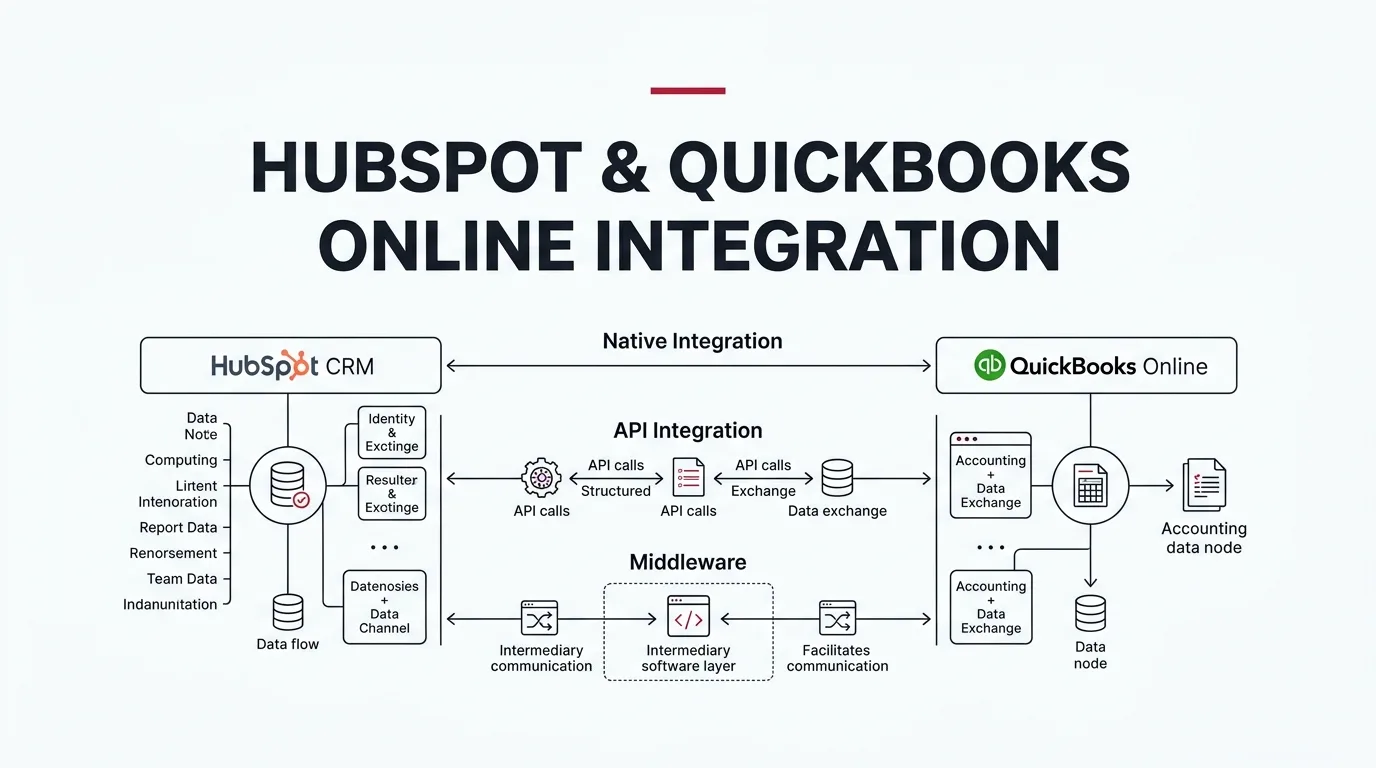
Enterprise Architectural Guide
Connecting HubSpot CRM with QuickBooks Online bridges the persistent operational divide between customer acquisition and financial operations. Instead of requiring sales representatives to request billing status updates manually or forcing finance teams to re-enter customer data across disparate systems, a disciplined integration delivers real-time invoice, customer, and transaction visibility directly where business teams work.
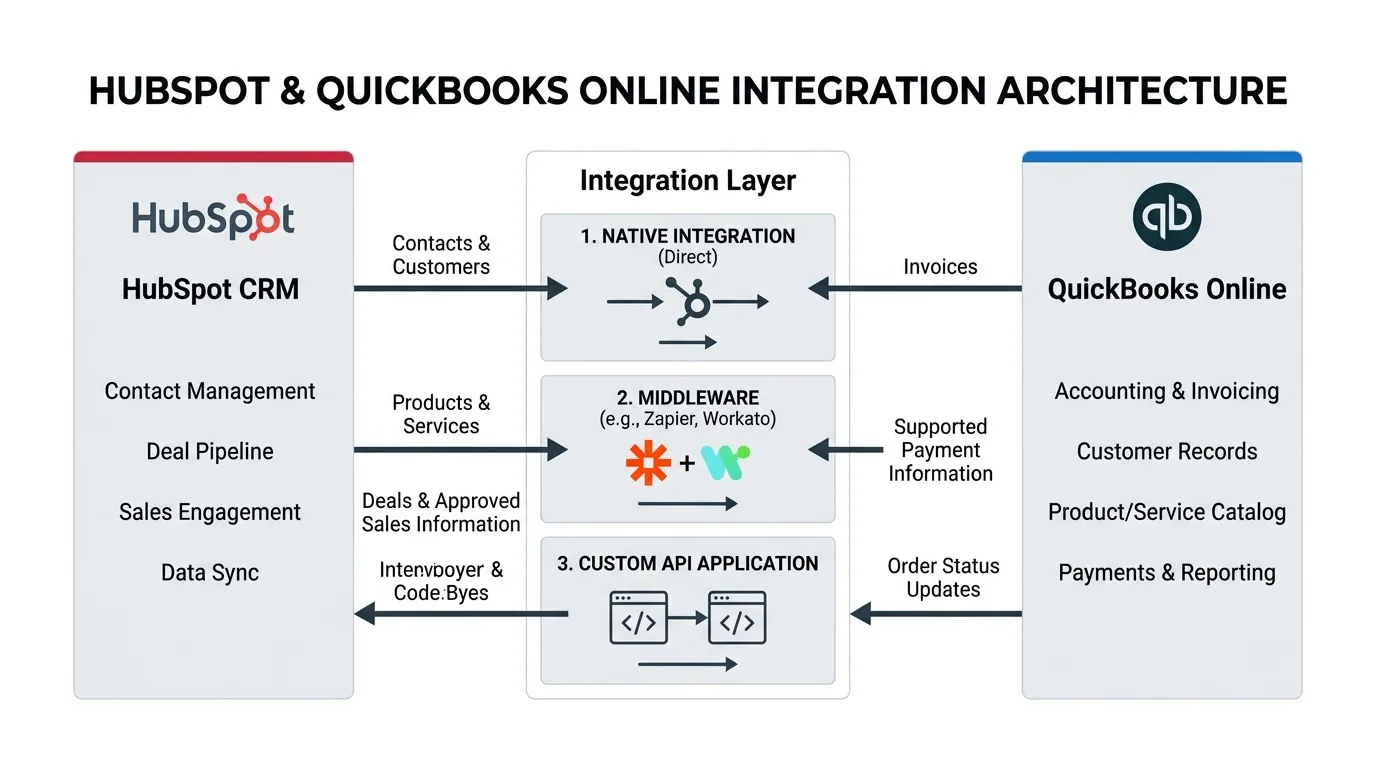
However, synchronizing sales pipelines with an authoritative general ledger is rarely as simple as clicking “install” on an app marketplace. The optimal architecture depends on record ownership rules, invoice creation workflows, tax calculation requirements, and multi-line payment reconciliation. Businesses evaluate four primary architectures: the Native HubSpot–QuickBooks Connector, Custom API Integration, Workflow Middleware (iPaaS), or a Dedicated Node.js Microservice. This guide evaluates the technical capabilities, architectural trade-offs, financial risk factors, and maintenance obligations of each approach to help enterprise leaders select the right integration strategy.
Scope Note: This guide focuses specifically on QuickBooks Online (QBO). QuickBooks Desktop utilizes a distinct proprietary SDK/Web Connector environment and requires separate architectural evaluation.
What Is HubSpot QuickBooks Integration?
A HubSpot QuickBooks integration establishes an automated data synchronization bridge between your front-office Customer Relationship Management (CRM) platform and your back-office accounting ledger. By connecting the two environments, essential customer identities, product catalogs, sales orders, invoices, and payment statuses flow programmatically between revenue operations and finance.
HubSpot specializes in pipeline orchestration—tracking leads, company interactions, sales stages, quotes, and customer lifecycle engagements. In contrast, QuickBooks Online serves as the immutable financial system of record—governing chart of accounts, tax jurisdictions, accounts receivable (AR), cash collection, and balance sheet reporting.
In an unintegrated architecture, personnel must perform repetitive double-entry data maintenance. Sales representatives close deals in HubSpot, then email accounting or submit tickets to create customer profiles and invoices in QuickBooks. This manual friction introduces data entry errors, discrepancies in customer billing names, delayed revenue recognition, and blind spots for account executives awaiting payment verification.
The Canonical Order-to-Invoice Lifecycle
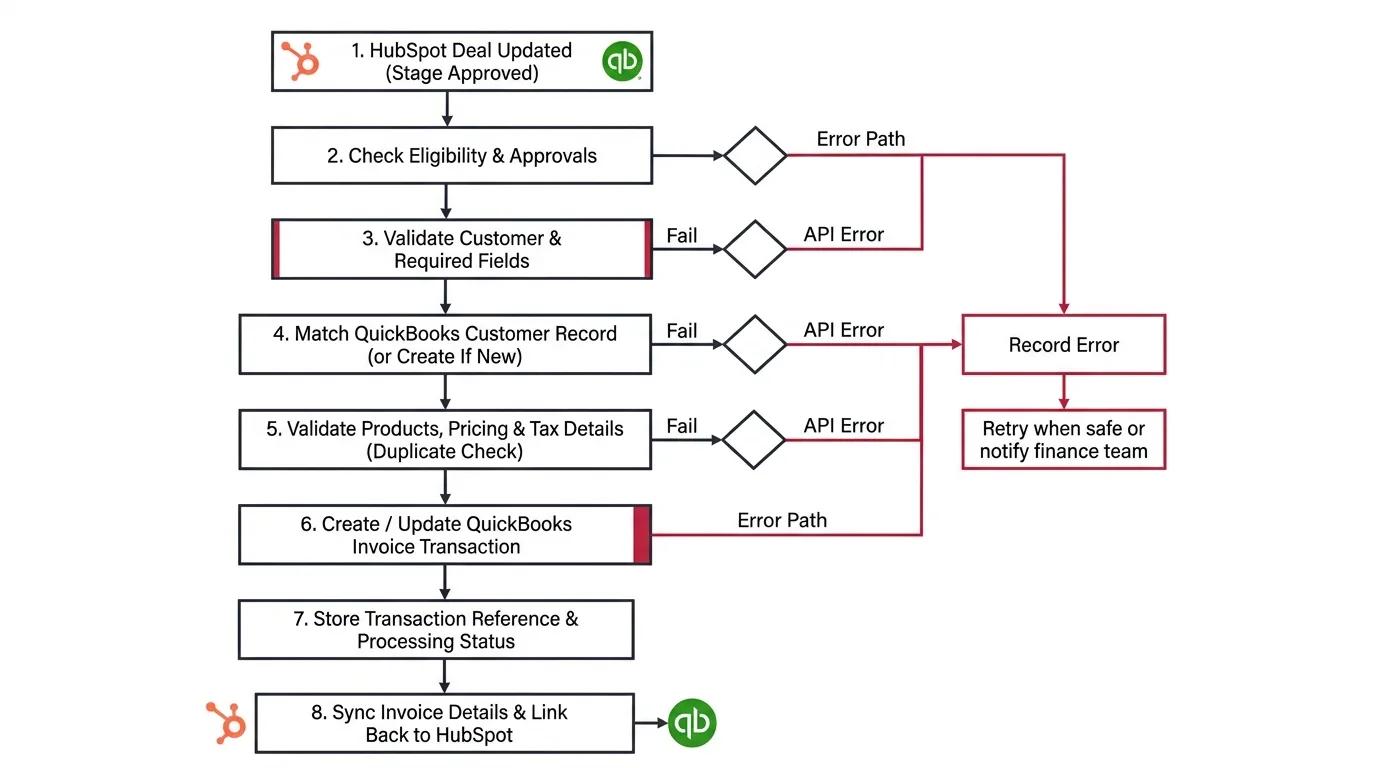
Consider a B2B enterprise closing an annual contract in HubSpot. When the deal advances to Closed-Won, an automated integration checks customer eligibility, maps line items against the QuickBooks product catalog, verifies sales tax codes, and generates a draft or active QuickBooks Online invoice. Once accounting dispatches the invoice and collects customer payment, the transaction reference, outstanding balance, and payment date sync back to HubSpot deal and contact timelines.
Architectural Blueprint: HubSpot & QuickBooks Online Data Flows
Bidirectional & Governed Flow
Why Integrate HubSpot With QuickBooks?
Synchronizing your CRM and accounting systems is not merely a convenience—it fundamentally eliminates systemic operational bottlenecks that stall enterprise velocity. Five core business outcomes justify this integration:
1. Eliminate Redundant Manual Data Entry
Maintaining parallel customer registries across HubSpot and QuickBooks inevitably produces typographical errors, duplicate contact profiles, and mismatched billing addresses. Programmatic synchronization applies strict validation rules to keep records aligned without human friction.
2. Real-Time Invoice & Payment Visibility
Sales and customer success teams need immediate visibility into whether an invoice has been dispatched, viewed, disputed, or settled. Providing invoice widgets within HubSpot CRM records allows client-facing teams to resolve billing questions instantly without logging into QuickBooks.
3. Accelerated Order-to-Cash Workflows
Connecting CRM deal milestones directly to QuickBooks invoice generation shortens the order-to-cash cycle. Closed deals immediately trigger invoice drafts with pre-validated tax, line items, and payment terms, compressing days of administrative lag into automated seconds.
4. Unified Customer Record Consistency
Differences in legal entity names, tax identification numbers, and contact roles create major accounting audit issues. A unified integration establishes master data management (MDM) ownership, designating which system controls billing identifiers and customer schemas.
5. Enhanced Operational Reporting with Ledger Integrity
Exposing reconciled invoice amounts and payment timestamps within HubSpot empowers revenue operations leaders to measure true collected cash versus theoretical pipeline value. Crucially, this operational CRM visibility preserves QuickBooks as the immutable financial system of record for revenue recognition and compliance.
Option 1: Native HubSpot QuickBooks Online Integration
The native HubSpot QuickBooks Online integration—developed and maintained directly by HubSpot—is available through the HubSpot App Marketplace. It represents the logical first evaluation point for organizations with conventional sales and accounting workflows.
Designed as a no-code connector, the native integration allows system administrators to configure bidirectional or unidirectional synchronization rules across core data models:
Maps HubSpot Contacts to QuickBooks Customers based on email and name matching rules.
Synchronizes standard product catalog line items, descriptions, and baseline unit prices.
Creates invoices from HubSpot deals or displays QuickBooks invoices inside HubSpot CRM cards.
Synchronizes credit memos applied against customer accounts for visibility.
Transfers paid-in-full dates and transaction amounts associated with single invoices.
Publishes invoice creation and payment notifications directly on HubSpot deal timelines.
How the Native Integration Operates
- Marketplace Installation: Install the QuickBooks Online app from the HubSpot App Marketplace.
- OAuth Authorization: Authenticate with QuickBooks Online admin credentials to authorize multi-tenant tenant access.
- Sync Rule Configuration: Define sync direction (one-way or two-way) independently for Contacts, Products, and Invoices.
- Field Mapping Verification: Map standard and custom properties within HubSpot data sync parameters (subject to subscription tier).
- Sync Filtering: Set inclusion criteria (e.g., only contacts with a specific lifecycle stage or deals in Closed-Won).
- Staging & Sandbox Testing: Run synchronization on isolated test records and verify accounting ledger integrity.
- Telemetry Monitoring: Review the HubSpot Sync Health dashboard to address sync errors, duplicate conflicts, or missing fields.
Advantages of the Native Integration
- Rapid Time-to-Value: Operational within hours without software development or server infrastructure.
- Zero Custom Hosting Costs: Managed entirely on HubSpot’s managed infrastructure with no API rate limit hosting overhead.
- Automated Upgrades: HubSpot engineers continuously maintain connector compatibility with QuickBooks Online API schema updates.
- Ideal for Standard Workflows: Perfectly addresses straightforward contact-to-customer and invoice visualization needs.
Critical Limitations & Gotchas
- Invoice Edit Lockouts: Modifying an invoice inside QuickBooks Online that originated in HubSpot frequently breaks subsequent sync updates.
- Multi-Invoice Payment Limitations: When a customer submits a single batch payment covering multiple invoices in QuickBooks, payment data often fails to attribute back to individual HubSpot deals.
- Complex Tax Governance: Automated sales tax calculations, VAT, GST, and foreign currency handling outside the United States face strict functional constraints.
- Restricted Field Transformation: Cannot execute custom business logic, dynamic line-item splits, or multi-object aggregation prior to ledger posting.
Option 2: HubSpot QuickBooks Custom API Integration
When standardized marketplace connectors cannot accommodate your organization’s financial governance or operational workflows, a custom API integration connects HubSpot and QuickBooks Online directly through their programmatic RESTful interfaces.
By leveraging the HubSpot CRM API v3 and Intuit QuickBooks Online Accounting API, enterprise engineering teams can construct granular, event-driven integration services. Rather than syncing all closed deals unconditionally, a custom API service enforces rigorous business validation before posting financial transactions.
What Can a Custom API Integration Deliver?
Organizations partnering with our custom API integration services implement advanced architectural controls that standard connectors cannot support:
Deterministic Customer Matching
Match customer records using proprietary identifiers—such as tax registration numbers, ERP internal IDs, or parent-child corporate hierarchies—eliminating duplicate customer creation.
Conditional Invoice Generation
Trigger invoice generation only when specific governance conditions are verified: legal entity approvals, credit risk clearance, and mandatory custom accounting fields.
Dynamic Data Transformation
Convert multi-currency exchange rates, calculate tiered discount structures, split revenue across multiple classes or departments, and format line items according to general ledger requirements.
Resilient Error Handling & Retries
Implement idempotent request tokens, dead-letter message queues, exponential backoff retries, and automated Slack/email escalation when QuickBooks API errors occur.
Process Sequence: Deal-to-Invoice Automated Validation Workflow
Idempotent Flow
Custom API Architecture Trade-Offs
- Unrestricted Architectural Control: Build precise business logic tailored to your exact operational and accounting compliance standards.
- Multi-System Orchestration: Seamlessly incorporate secondary ERPs, warehouse management systems (WMS), or subscription billing engines into the same workflow.
- Zero Platform Tax: Avoid per-task or per-operation middleware platform subscription costs on high transaction volumes.
- OAuth 2.0 Token Maintenance: QuickBooks Online access tokens expire in 60 minutes and refresh tokens rotate every 101 days, requiring secure, automated token rotation.
- API Rate Limit Management: Intuit enforces a maximum limit of 500 requests per minute per realm; batching and queuing logic is mandatory.
- Ongoing Infrastructure Ownership: Requires dedicated cloud hosting (AWS Lambda, Google Cloud Run), monitoring, and security patching.
Option 3: Middleware Integration (iPaaS)
Middleware integration—frequently referred to as Integration Platform as a Service (iPaaS)—deploys an intermediary orchestration platform between HubSpot and QuickBooks Online. Rather than coding custom microservices from scratch, teams configure visual workflow automation logic utilizing pre-built API connectors.
Leading integration platforms include enterprise iPaaS solutions (Workato, Boomi, Celigo) as well as modern workflow automation engines such as self-hosted n8n clusters, Make, and Zapier.
Example: Orchestrating a Governed Deal-to-Invoice Workflow in n8n
In a typical middleware workflow orchestrated via n8n or Make, data travels through discrete, auditable transformation nodes:
Webhook Trigger: HubSpot fires an automated webhook when a deal transitions to Contract Signed.
Conditional Router: Evaluates custom deal properties (e.g.,
Billing_Frequency = Annual and Finance_Approval = Approved).
Customer Search Node: Queries QuickBooks Online API by
TaxIdentifier or CompanyName.
Data Transformation Node: Formats currency, applies tax exempt codes, and structures line items into QBO JSON.
Transaction Creation: Calls QuickBooks Online Invoice API and captures the generated Invoice ID and DocNumber.
Callback Sync: Updates the HubSpot Deal record with
QuickBooks_Invoice_Number and a direct URL to the invoice.
Strengths of Middleware
- Visual Workflow Governance: Non-developers can inspect execution logs, review failed executions, and understand flow branching.
- Rapid Prototyping: Workflows can be constructed, tested, and iterated significantly faster than full-stack custom code.
- Extensive Multi-App Connectivity: Easily append downstream steps (e.g., alerting finance channels in Slack, generating PDF contracts, or logging audits to Snowflake).
Middleware Vulnerabilities
- Scaling Cost Risks: Commercial cloud iPaaS pricing escalates sharply as task and execution volumes surge.
- Connector Constraints: Pre-built platform nodes may lag behind the newest QuickBooks API attributes or pagination capabilities.
- Visual Spaghetti Complexity: Highly branched logic spanning dozens of conditional rules becomes brittle and challenging to unit test.
Option 4: Custom Node.js Integration Application
A custom Node.js integration is a purpose-built, containerized software application designed specifically to manage synchronization, transformation, and business logic between HubSpot and QuickBooks Online.
Node.js is an exceptional architectural choice for high-volume enterprise integrations due to its asynchronous, non-blocking I/O event model, vast ecosystem of TypeScript/JavaScript SDKs, and lightweight runtime footprint on serverless or Kubernetes infrastructure.
When Does a Dedicated Node.js Service Make Sense?
- High Transaction Volumes: Processing thousands of daily deals, invoices, or customer transactions where cloud iPaaS execution pricing becomes prohibitive.
- Stateful Reconciliation & Audit Logs: When compliance demands an immutable internal database recording every sync event, transformation delta, and response payload.
- Complex Computational Logic: Calculating dynamic multi-tier commissions, prorated subscription billing, deferred revenue splits, or multi-currency exchange hedges.
- Dedicated Queue & Worker Architecture: Managing asynchronous queues (BullMQ, Redis, Amazon SQS) to decouple webhook ingestion from QuickBooks API rate limit constraints.
- Proprietary Admin Interfaces: Building internal ops dashboards where finance and sales ops teams can manually retry failed transactions with modified data payloads.
Modular Production Architecture for Node.js Integration
Fastify or Express HTTP server receiving HubSpot and QuickBooks webhooks with cryptographic HMAC signature verification.
BullMQ queue separating incoming webhook traffic from processing workers to prevent server saturation during batch operations.
Secure Redis/Postgres vault handling Intuit OAuth 2.0 token rotation, automated refresh, and concurrency locks.
Zod or JSON Schema validators verifying payload completeness (SKUs, tax IDs, shipping addresses) before executing QuickBooks API requests.
Persistent mapping store tracking HubSpot_Deal_ID to QuickBooks_Invoice_ID to strictly guarantee zero duplicate invoices.
Nightly cron worker comparing QuickBooks general ledger invoice totals against HubSpot Closed-Won pipeline aggregates.
Native Integration vs API vs Middleware vs Node.js
Selecting the optimal integration architecture requires balancing technical capability against development overhead, ongoing maintenance, and total cost of ownership (TCO). No single architecture is universally superior; each excels under specific organizational conditions.
Comprehensive Comparison: Architectural Evaluation Matrix
Architectural Analysis
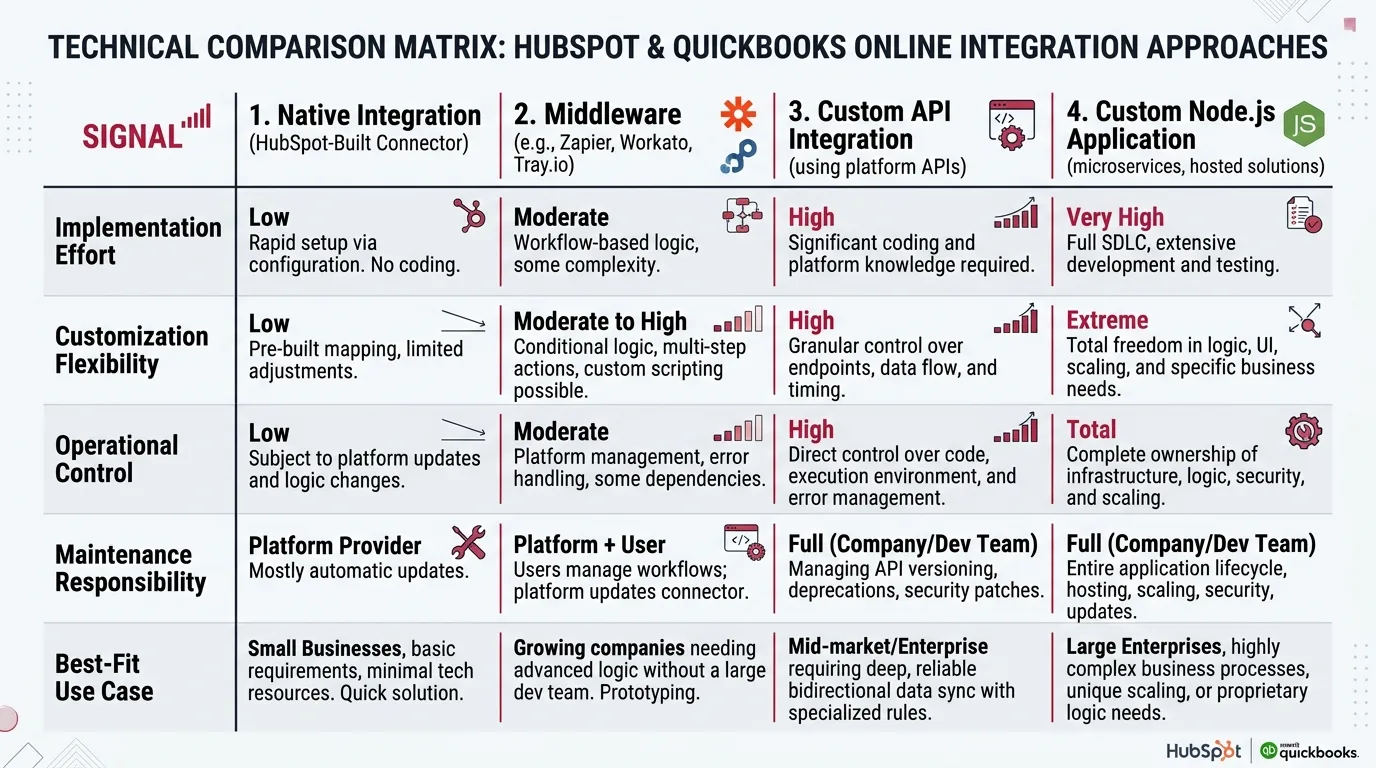
Detailed Architectural Comparison Framework
TCO & Capabilities
| Evaluation Factor | Native Integration | Middleware (iPaaS) | Custom API | Custom Node.js Service |
|---|---|---|---|---|
| Implementation Effort | Low (Hours to days) | Low to Moderate (1–3 weeks) | High (4–8 weeks) | High (6–10 weeks) |
| Upfront Development Cost | Lowest (Included in app) | Low to Moderate | Moderate to High | Moderate to High |
| Custom Business Logic | Restricted to pre-built filters | High (Visual rules & JS snippets) | Unlimited | Unlimited |
| Data Transformation Flexibility | Direct 1:1 field mappings | High (Node-based mapping) | Complete programmatic freedom | Complete programmatic freedom |
| Multi-System Integration | HubSpot <—> QBO only | Native multi-app routing | Custom architecture required | Ideal for microservice hubs |
| Operational & Audit Control | Basic sync health logs | Platform execution history | Custom logging dependent | Dedicated database & audit trails |
| Ongoing Maintenance Profile | Managed by HubSpot/Intuit | Platform and flow maintenance | Internal code & token updates | DevOps, token, & infrastructure lifecycle |
| Best-Fit Deployment | Standard contact & invoice sync | Cross-app automated workflows | Specialized API transaction rules | High-scale, auditable enterprise services |
Should You Use Middleware or Build a Custom Node.js Integration?
For organizations that have outgrown the native marketplace connector, the most frequent architectural dilemma is deciding between iPaaS middleware (e.g., n8n, Make, Workato) and a custom Node.js application.
The central question is not whether Node.js is technically superior to middleware. The real question is: does your business logic require the additional engineering investment and long-term infrastructure maintenance that custom software commands?
Select Middleware (iPaaS) When:
- You need to automate 2 to 10 discrete workflow triggers between systems.
- Existing platform connectors support your required objects and properties.
- Your internal business logic can be represented cleanly in visual branch diagrams without deep nesting.
- Operations leaders want to adjust field mappings or notification targets without redeploying code.
- Transaction volume is predictable and within reasonable platform execution licensing tiers.
- You want visual execution logs without managing custom Elasticsearch or CloudWatch log stacks.
Select Custom Node.js Development When:
- The integration requires complex data transformations, custom SQL lookups, or multi-step math that overcomplicates visual workflows.
- You need strict queueing, dead-letter storage, and rate-limit buffering to protect QuickBooks API quotas.
- You require an internal PostgreSQL or Redis database to maintain immutable sync history, state tracking, and customer matching keys.
- Middleware task licensing costs on high-volume transactions exceed the cost of dedicated serverless hosting.
- Your compliance framework (SOC 2, ISO 27001, HIPAA) mandates self-hosted, air-gapped data residency.
- Your organization possesses software engineering resources equipped to handle CI/CD, security patching, and monitoring.
The Hybrid Architectural Pattern
In modern enterprise architectures, the choice is rarely binary. Many organizations successfully deploy a hybrid model:
The Native Connector handles baseline, high-frequency bidirectional Contact and Customer synchronization. Concurrently, a Middleware workflow or Node.js microservice handles governed Deal-to-Invoice generation, applying tax verification, line-item splitting, and payment notifications. By giving each tool an explicit scope of ownership, you maximize stability while minimizing custom engineering debt.
Which HubSpot QuickBooks Integration Should You Choose?
To determine the right technical path forward, walk through our sequential decision framework based on your actual business rules, transactional scale, and technical infrastructure:
Architectural Decision Tree: Selecting Your Integration Strategy
Decision Matrix
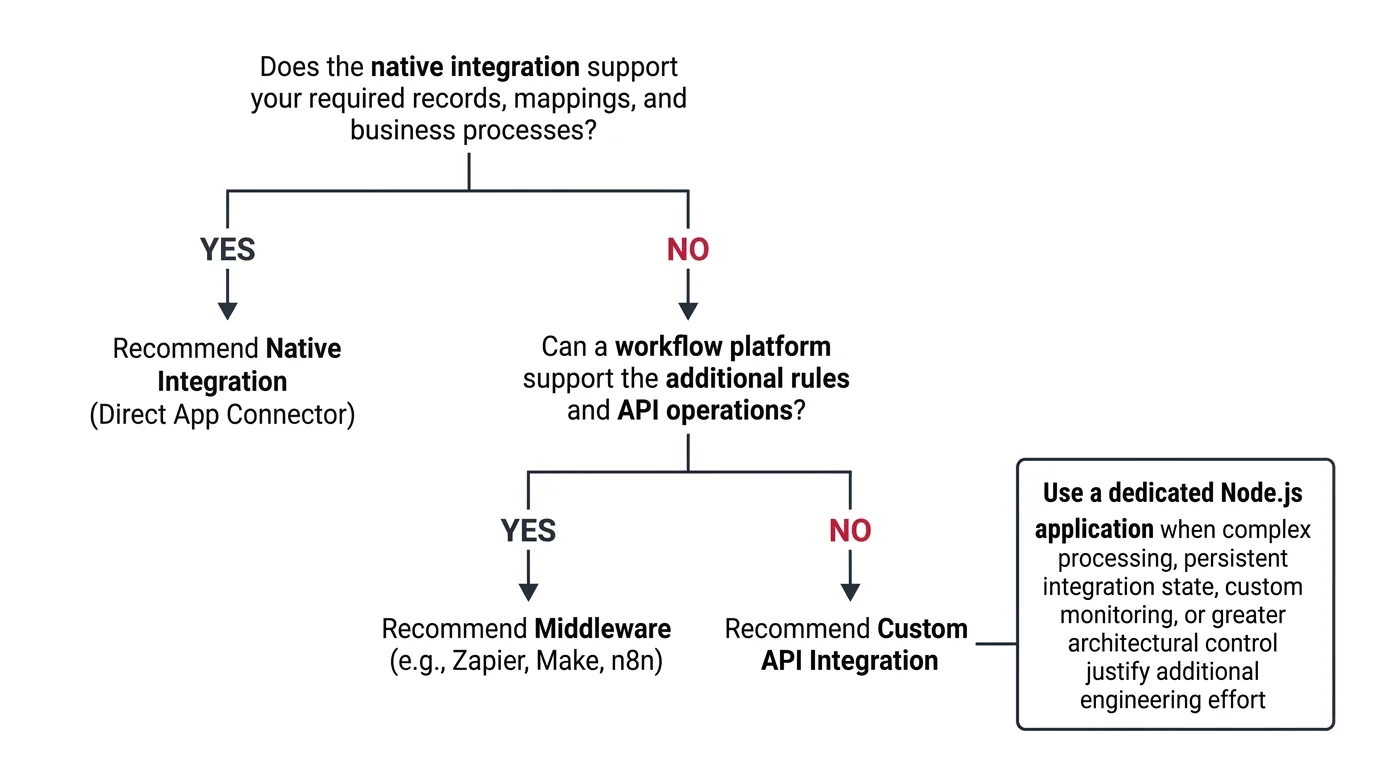
Your requirements center around standard contact-to-customer synchronization and basic invoice visualization. Your sales process creates standard invoices without complex line-item math, and default field mappings satisfy your accounting team.
You require conditional deal-to-invoice logic, notifications in communication channels (Slack/Teams), validation checks before invoice generation, or coordination with third-party apps like Stripe or DocuSign.
Your business enforces specialized customer identification rules, customized multi-currency transformations, or unique ERP workflows that standard connectors and visual workflow builders cannot reliably execute.
High transaction volume, stateful audit logging, asynchronous queue management, and total architectural sovereignty justify a purpose-built software application maintained by your engineering organization.
Evaluating integrations with other enterprise platforms? Explore our in-depth guides for HubSpot–NetSuite Integration and HubSpot–Salesforce Integration.
How iDesk Media Can Help With HubSpot QuickBooks Integration
iDesk Media is an enterprise systems integration and automation consultancy. Rather than pushing a one-size-fits-all product or unnecessary custom code, our engineering practice starts with your financial data model, sales workflow requirements, and existing technical stack.
Whether configuring standard marketplace connectors or building enterprise-grade middleware pipelines, our team delivers disciplined, production-grade solutions across five specialized practice areas:
Native Setup & Sync Remediation
We audit your existing HubSpot–QuickBooks Online marketplace setup, diagnose sync error logs, remediate duplicate contact/customer mappings, and optimize default sync rules.
Middleware Workflow Orchestration
We architect resilient, visual integration pipelines using n8n automation services, Make, or enterprise iPaaS platforms—complete with error handling and Slack notifications.
Custom API Engineering
Our developers construct bespoke integration logic connecting HubSpot and QuickBooks Online APIs for conditional deal-to-invoice workflows, tax handling, and multi-currency rules.
Dedicated Node.js Services
For high-transaction scale, we build containerized Node.js microservices featuring Redis/BullMQ queueing, persistent state databases, token rotation, and telemetry dashboards.
Comprehensive Integration Testing & Lifecycle SLA Support
Every integration deployment undergoes rigorous sandbox testing: idempotency verification, network failure recovery, duplicate payload prevention, and general ledger reconciliation checks. Our team provides ongoing SLA maintenance, token rotation monitoring, and API deprecation management. Explore our HubSpot implementation services to learn more.
Frequently Asked Questions
Does HubSpot have a native QuickBooks integration?
Yes. HubSpot provides a native integration for QuickBooks Online via the HubSpot App Marketplace. It supports bidirectional synchronization of selected records including Contacts/Customers, Products/Services, Invoices, and Credit Memos. However, its capabilities and custom field-mapping options depend on your HubSpot subscription and whether your business processes require complex conditional rules.
Can HubSpot automatically create invoices in QuickBooks Online?
Yes. In the native connector, invoices can be created from HubSpot deal records or quotes, provided products, prices, and customer data match supported schemas. However, if your invoicing workflow requires multi-stage approvals, custom line-item tax calculation, custom billing frequencies, or duplicate validation guards, middleware or custom API development is recommended.
Can QuickBooks payments sync to HubSpot?
Yes, payment information can synchronize under standard rules when payments correspond directly to a single invoice. However, QuickBooks payments distributed across multiple invoices or partial payments frequently encounter synchronization limitations in the standard connector. Always validate multi-invoice payment flows during testing.
What is the difference between native and API integration?
A native integration is a pre-built, turnkey app managed by HubSpot and Intuit that requires no code but enforces predefined data models and rules. A custom API integration connects the two platforms programmatically using their developer APIs, providing full control over data transformation, validation, and multi-system workflows at the cost of development and ongoing maintenance.
Is middleware better than a custom Node.js integration?
Neither is universally superior. Middleware (e.g., n8n, Make) is faster to configure and provides visual execution logs, making it ideal for standard workflows without extensive engineering. Custom Node.js applications excel when transaction volumes are large, data requires complex math or state management, and dedicated queueing buffers are necessary to protect API rate limits.
Can I use Zapier or n8n to connect HubSpot and QuickBooks Online?
Yes. Both Zapier and n8n offer native triggers and actions for both HubSpot and QuickBooks Online, alongside custom HTTP webhook capabilities. n8n is particularly popular for enterprise deployments because it can be self-hosted, eliminating per-task execution fees and ensuring full data privacy.
Is custom integration more expensive than the native connector?
In upfront development cost, yes—custom development requires engineering investment. However, total cost of ownership (TCO) should consider the cost of manual administrative corrections, lost billing velocity, and customer reconciliation delays caused by native connector limitations. For complex businesses, custom automation frequently yields significant net ROI.
Can HubSpot QuickBooks integration work for businesses outside the United States?
Yes, but international tax requirements require careful validation. In jurisdictions with VAT, GST, or multi-rate provincial sales taxes (e.g., UK, Canada, Australia, EU), QuickBooks Online enforces strict tax agency rules that standard connectors may not handle seamlessly. Validating country-specific tax rules prior to selecting an integration approach is critical.
How long does HubSpot QuickBooks integration take?
A standard native setup can be configured and tested within 3 to 7 business days. Middleware automations typically take 2 to 4 weeks depending on workflow complexity. A custom API or Node.js microservice typically spans 4 to 8 weeks, encompassing architectural discovery, schema mapping, queue architecture, sandbox testing, and accounting reconciliation.
How much does HubSpot QuickBooks integration cost?
Cost varies by scope. Native setup assistance and troubleshooting typically range from $1,500 to $4,000. Middleware automation projects typically range from $4,000 to $10,000. Comprehensive custom API or Node.js applications range from $12,000 to $30,000+ depending on multi-currency requirements, queueing infrastructure, and custom reporting dashboards.
Let’s Find the Right HubSpot QuickBooks Integration for Your Business
Not sure whether the native HubSpot–QuickBooks integration is sufficient for your financial workflows, or if your order-to-cash pipeline requires middleware automation or custom API development? iDesk Media helps growth enterprises evaluate integration data flows, eliminate billing friction, and implement reliable architectures built around their exact business requirements.