
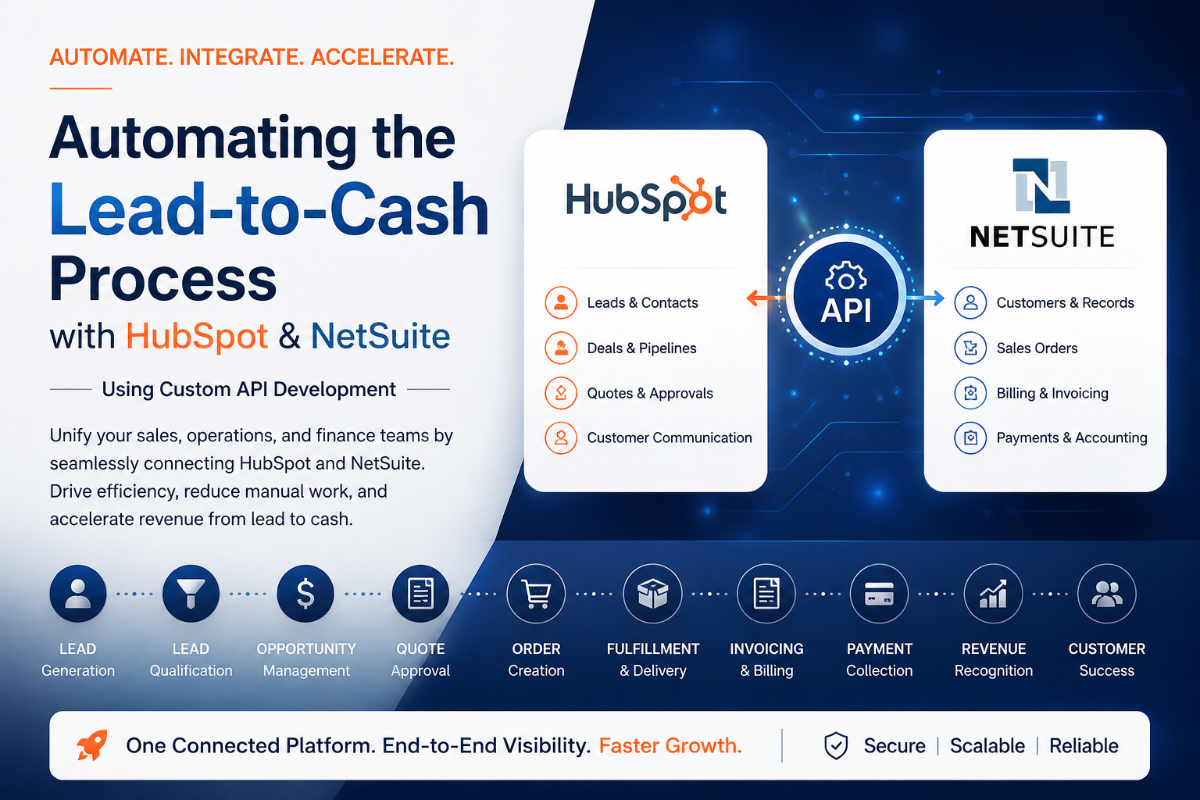
Automating the Lead-to-Cash Process with HubSpot and NetSuite Using Custom API Integration
Many growing businesses reach a point where their sales team lives in one system while their finance and operations teams work in another. Marketing generates leads in HubSpot, sales closes deals in HubSpot, but invoicing, revenue recognition, inventory, fulfillment, and accounting happen in NetSuite.
While both platforms are powerful in their own right, organizations often struggle with disconnected processes, duplicate data entry, inconsistent reporting, and delays between closing a sale and generating revenue.
This is where Lead-to-Cash automation becomes critical.
By integrating HubSpot and NetSuite through custom API development, organizations can create a seamless workflow that connects marketing, sales, finance, operations, and customer success into a single automated process.
What is Lead-to-Cash?
Lead-to-Cash (L2C) refers to the complete business process that starts when a prospect first interacts with your company and ends when revenue is collected.
- Lead Generation
- Lead Qualification
- Opportunity Management
- Quotation
- Sales Order Creation
- Fulfillment
- Invoicing
- Payment Collection
- Revenue Recognition
- Customer Success and Renewal
Common Challenges Without Integration
Duplicate Data Entry
Sales representatives create customer records in HubSpot while accounting teams recreate the same records in NetSuite, resulting in duplicate data and administrative overhead.
Delayed Order Processing
A deal may be marked Closed Won in HubSpot, but someone still needs to manually create customer records, sales orders, and invoices in NetSuite.
Reporting Discrepancies
Sales and finance teams often work from different datasets, resulting in inconsistent reporting and confusion.
Poor Customer Experience
Manual processes create delays in onboarding, fulfillment, invoicing, and support.
Why Use Custom API Integration Instead of Standard Connectors?
Many organizations outgrow native connectors because of complex pricing models, multi-subsidiary operations, custom workflows, subscription billing requirements, and unique business processes.
Custom API integration provides:
- Complete control over business logic
- Advanced data transformation
- Custom object synchronization
- Enhanced error handling
- Scalability for future growth
High-Level Integration Architecture
HubSpot
- Lead Management
- Marketing Automation
- CRM
- Deal Management
Integration Layer
- Custom APIs
- Data Validation
- Business Rules Engine
- Error Handling
- Audit Logging
NetSuite
- ERP
- Accounting
- Sales Orders
- Inventory Management
- Revenue Recognition
Automating the Lead-to-Cash Lifecycle
1. Lead Creation
Website forms, landing pages, events, and marketing campaigns create leads directly in HubSpot.
2. Lead Qualification
Once a lead reaches a Sales Qualified Lead stage, the integration can validate and synchronize customer records with NetSuite.
3. Opportunity Management
Deals are managed in HubSpot while product catalogs and pricing can be synchronized from NetSuite.
4. Quote Approval
Custom workflows automate discount approvals, pricing reviews, and exception handling.
5. Closed Won Automation
When a deal reaches Closed Won status:
- Customer validation occurs
- Customer records are created or updated
- Sales Orders are generated in NetSuite
- Taxes and pricing are calculated
- Departments and subsidiaries are assigned
Order Fulfillment Automation
Once the Sales Order exists in NetSuite, fulfillment processes begin automatically.
- Inventory allocation
- Warehouse assignment
- Project creation
- Subscription provisioning
Status updates can be synchronized back into HubSpot for sales visibility.
Invoice Automation
NetSuite generates invoices based on fulfillment milestones or billing schedules.
Invoice information can automatically sync back to HubSpot including:
- Invoice Number
- Invoice Date
- Invoice Amount
- Payment Status
Payment Synchronization
As payments are received in NetSuite, the integration updates HubSpot so sales and customer success teams can see account health and payment status.
Customer Success Automation
The Lead-to-Cash journey should not stop after payment.
Organizations can automate:
- Renewal reminders
- Upsell opportunities
- Customer health monitoring
- Subscription lifecycle management
Recommended System Ownership
| Object | System of Record |
|---|---|
| Leads | HubSpot |
| Contacts | HubSpot |
| Companies | HubSpot |
| Opportunities | HubSpot |
| Products | NetSuite |
| Customers | NetSuite |
| Sales Orders | NetSuite |
| Invoices | NetSuite |
| Payments | NetSuite |
Error Handling and Monitoring
- Retry mechanisms
- Audit logs
- Failure notifications
- Dead letter queues
- API monitoring
Security Considerations
- OAuth authentication
- Encrypted communication
- Role-based access control
- Token rotation
- Data validation and governance
Business Benefits
- Faster revenue recognition
- Reduced manual work
- Improved customer experience
- Accurate reporting
- Scalable operations
- Cross-department visibility
Conclusion
Lead-to-Cash automation is not simply about connecting two systems. It is about connecting departments, eliminating operational bottlenecks, and creating a unified revenue process across the organization.
HubSpot excels at customer acquisition and relationship management, while NetSuite provides enterprise-grade financial and operational control. When integrated through a custom API framework, the result is a streamlined revenue engine capable of supporting sustainable growth.
The ultimate objective is simple: move from lead to revenue with minimal manual intervention, maximum visibility, and complete operational accuracy.
Need a custom Integration Blueprint?
We can design a customized automation roadmap specifically targeting your CRM sync issues and ERP bottlenecks. Get a free architecture audit.
Get Free Blueprint →